
Suppose you’re staff in a support channel which isn’t very frequented by other users, and you want Textual to make a sound and show a notification (i.e. trigger a highlight) whenever someone joins that support channel.
The chat filter can trigger some actions when certain things happen, like user joins channel #foo, and we are going to use the /notifybubble and /notifysound commands to alert us about this event.
- Go to Preferences -> Add-Ons -> Chat Filter and click the + in the lower left to create a new filter
- on the Filter tab, give the filter a name (example: Alert for joins on #foo), then copy paste this into the Filter Action field:
/notifysound Glass
/notifybubble %_channelName_% %_senderNickname_% joined %_channelName_%
- on the Channels tab, select Specific Items and select the channel(s) you want to watch for joins in the list that opens
- on the Events tab, make sure only User joined channel is selected
- The last three tabs Sender, Notes and Advanced are completely empty
Whenever someone joins your channel now, you will get a notification and a sound:
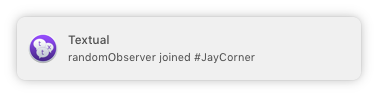
Bonus feature: If you click the notification, it will automatically take you to that channel!
Worth keeping in mind that you can trigger applescripts from filters. That means you are not limited to a textual notification.
Example script using the “user joined” event:
on textualcmd(arrivee, channelName)
if (arrivee is “jay”) then
return “Here I am, bitches”
else if arrivee is “liz” then
return “Hello beautiful”
end if
return “” — default
end textualcmd
In the filter action just type /whatever and then save the applescript as whatever.scpt
This script will then automatically respond when particular people (including yourself, if you wish) join the room.